Table of Contents
Why Google Business Profiles get suspended for home service contractors, how to tell which kind you have, and how to file an appeal that holds up.

A suspended Google Business Profile takes a home service contractor out of the map pack and off the phone. For a business that works from trucks and has no storefront, the profile is the storefront. This post covers what a suspension looks like, what in a contractor’s own setup usually triggers it, how to tell which kind you have, and how to file an appeal that holds up. The wording is Google’s, checked against Google Business Profile Help on October 22, 2026.
What a suspension looks like, and what you can still see
Google’s help page is titled “Fix suspended or disabled profiles,” and it uses three words. A profile is suspended or disabled when it breaks the guidelines. It is removed when the public can no longer see it. Your account is restricted when Google has flagged the person, not the profile: every profile you manage is suspended at once and you can’t create or claim another.
From the outside, a removed profile is gone; customers searching your name see nothing, or a competitor. From the inside, you and your managers can no longer act on it. The status lives in the appeals tool, which shows the decision date, the reason, the policy Google says you broke, whether it can be appealed, and one of five statuses: Eligible for appeal, Submitted, Approved, Not Approved, or Can’t be appealed.
The industry talks about “soft” and “hard” suspensions. Google doesn’t. The distinction that matters is the one the tool makes: can it be appealed, and has the appeal been used.
The causes that hit service-area businesses hardest
Most contractor suspensions trace back to a setting the owner, a past employee or a past agency chose. Google’s “Guidelines for representing your business on Google” (checked October 22, 2026) names the rules. These are the ones that matter for a residential trade.
An address shown that should be hidden. If you don’t serve customers at your business address, Google’s rule is to remove the address and list service areas instead. A plumber working from home, or a garage door company with a yard but no front counter, is a service-area business. Showing the address invites a check the location fails. PO boxes, remote mailboxes and unstaffed virtual offices aren’t eligible at all.
A service area set wider than you work. You can list up to 20 areas by city or postal code. Google doesn’t allow a radius, and the whole area shouldn’t extend more than about two hours of driving from where the business is based. A Chandler HVAC company listing Tucson, Flagstaff and Yuma is telling Google something its trucks can’t back up.
A keyword added to the name. The name must match the real-world name on your trucks, signage and invoices. Taglines, locations, phone numbers and extra descriptors aren’t allowed, and Google’s guidelines say unnecessary information in the name “could result in the suspension” of the profile. It is the one violation the guidelines tie to suspension by name. “Smith Plumbing” becoming “Smith Plumbing – Emergency Plumber Gilbert” is the pattern, and it is often an agency’s doing.
Category and website mismatch. Google asks for as few categories as possible, chosen to describe the core business, never used solely as keywords. If the primary category says roofer and the website says remodeling, or the site is a lead-gen page carrying a different company name, the profile looks like something other than what it claims.
A duplicate from a past owner or a past agency. Google permits one profile per business location. A second listing created by a previous owner, an old vendor or a well-meaning office manager is a duplicate, and Google will act on one or both.
How to tell which kind you have before you touch anything
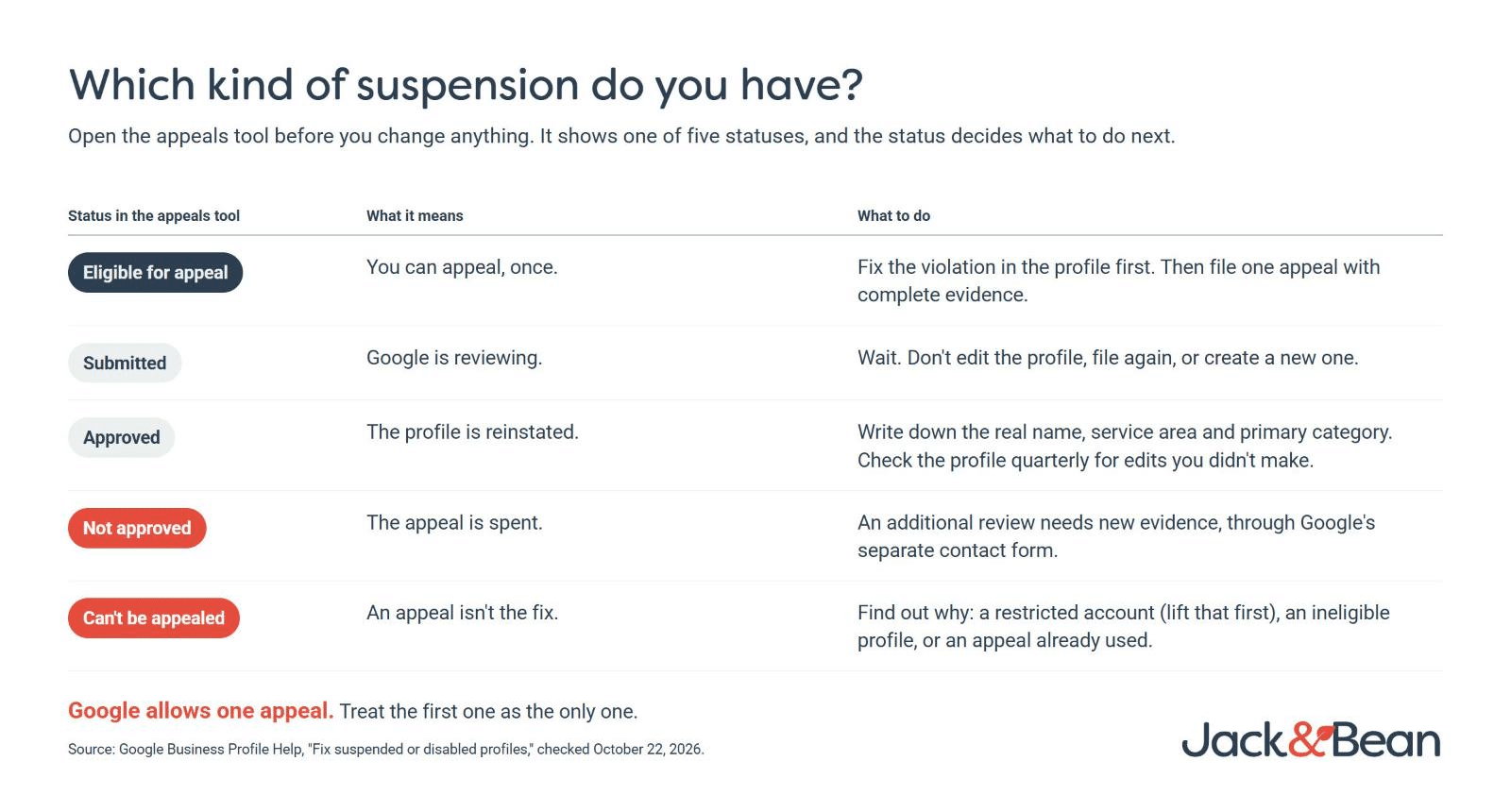
Open the appeals tool before you change a single field. Three things decide what you do next.
First, the reason and the policy named. Match them against the list above. Most of the time the cause is already in the profile: a name that grew a suffix, a service area that grew a state, an address that should be hidden.
Second, whether the status says “Can’t be appealed.” If it does, the fix isn’t an appeal. It is finding out why: an account restriction, a profile Google considers ineligible, or an appeal already used.
Third, whether your account is restricted. Google’s instruction is to lift the account restriction first and appeal the profile second. Appealing while the account is restricted wastes the one appeal you have.
Fix the violation in the profile, where Google lets you, before you file. An appeal that says “we corrected the name and hid the address,” with the corrected profile behind it, is a different submission from one asking Google to overlook the problem.
The reinstatement request: what to gather and what to submit
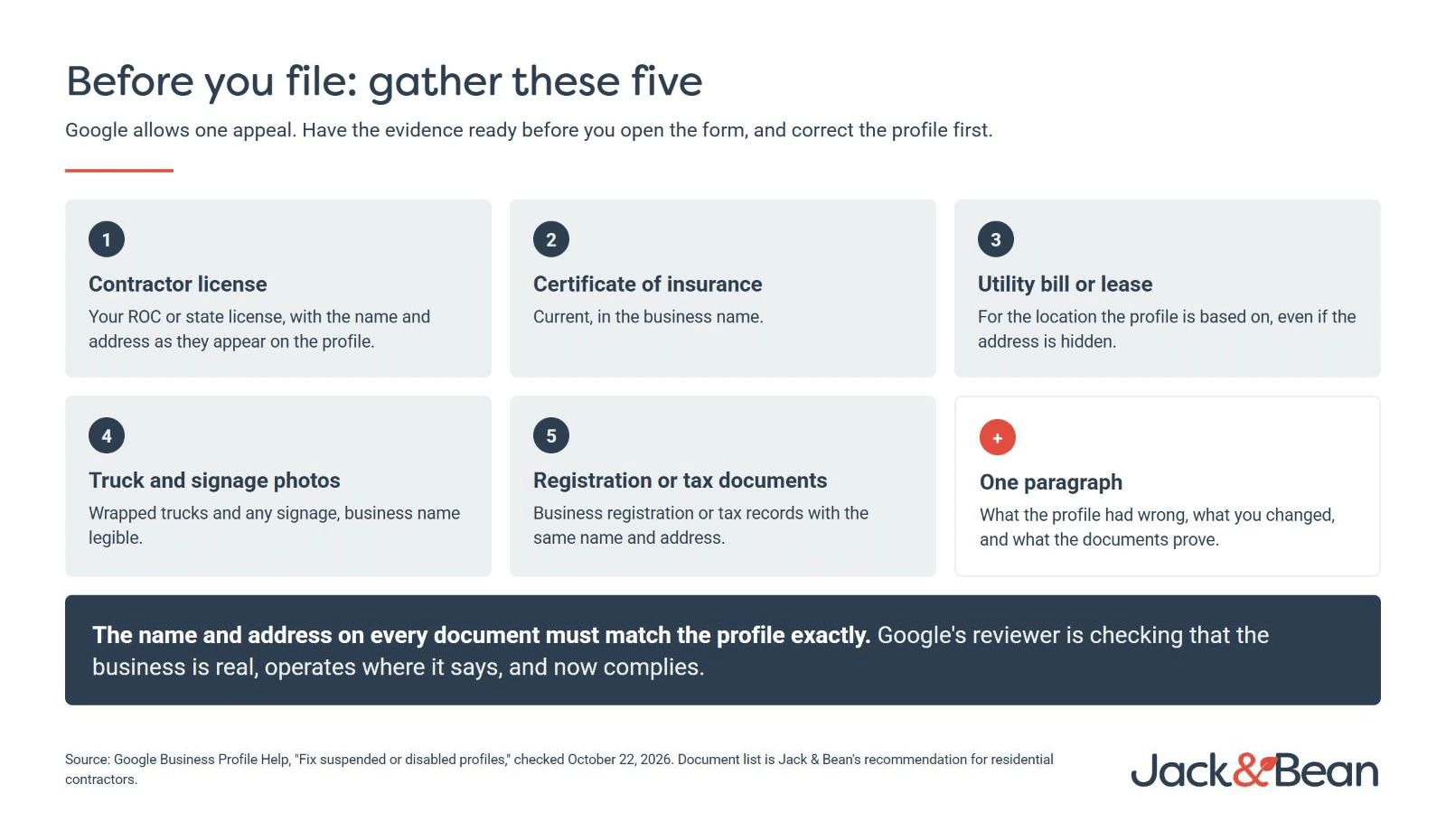
Google’s appeal is four steps: open the appeals tool and confirm the right account, select the profile and the decision, upload evidence and write a response, then confirm and submit. The evidence Google lists is official business registration, a business license, tax certificates and utility bills. The name and address on every document must match the profile exactly.
For a contractor, gather these before you open the form:
- Your ROC or state contractor license, with the name and address as they appear on the profile
- A current certificate of insurance
- A utility bill or lease for the location the profile is based on, even if the address is hidden
- Photos of wrapped trucks and any signage, business name legible
- Business registration or tax documents with the same name and address
Write the response in plain language: what the profile had wrong, what you changed, and what the documents prove. One paragraph. The reviewer is checking whether the business is real, operates where it says, and now complies.
One more thing to expect: Google chooses the verification method, and video is the one it recommends where it’s offered. If the profile has to verify again, be ready to film the outside signage or location, your branded trucks and tools, and something that proves you run the business.
Why the second attempt is the one that fails
Google’s help page states it in a note: appeals can only be submitted once. If the appeal is not approved, Google may allow an additional review, but only with new evidence and through a separate contact form.
That is why the fast first appeal is the expensive one. An owner who files the day the profile goes down, with a screenshot of a license and no changes to the profile, has spent the appeal. Treat the first one as the only one.
What not to do
Don’t create a new profile. Google says this in bold on its own help page. A new profile for a suspended business is a duplicate, and it ties the new listing to the problem you were trying to escape.
Don’t pay a “fixer.” The calls arrive within days of a suspension: reinstated in 48 hours, guaranteed. Nobody outside Google can guarantee a reinstatement, and the fixer uses the same appeals tool you do, with your one appeal.
Don’t move to a virtual office or a lead-gen address. It fails Google’s eligibility rules and turns a fixable profile into one that can’t be appealed.
Don’t answer the robocall. Google doesn’t cold-call with suspension threats or a verify-today deadline. The real status is in the appeals tool.
What to put in place so it doesn’t happen twice
Write down the real-world name, the service area and the primary category, and treat a change to any of them as something the owner approves. Give an agency manager access, never primary ownership, so a vendor leaving doesn’t take the profile with them. Check the profile quarterly for edits you didn’t make: Google applies suggested edits from the public, and a keyword can land in your name without you noticing until the suspension does.
For an owner, the implication is simple. The profile is a licensed asset like the trucks, and it needs the same ownership, documentation and discipline. Most suspensions are self-inflicted, and most are avoidable.
If your profile is down, or you’re not sure what it says your service area is, request a free audit and we’ll look at the profile, the website behind it and what’s sending the phone calls.
FAQ
How long does Google Business Profile reinstatement take?
Google’s help page gives no timeline. Appeals show as Submitted until a decision, then Approved or Not Approved. Filing once, with complete evidence and a corrected profile, is the only lever you control.
Can I appeal a Google Business Profile suspension more than once?
No. Google states that appeals can only be submitted once. If an appeal is not approved, Google may allow an additional review with new evidence through a separate contact form.
Should a contractor hide the business address on Google?
If you don’t serve customers at the address, yes. Google’s guidelines say service-area businesses should hide the address and list the areas they serve, up to 20, within about two hours of driving from the base.
Can a virtual office get my suspended profile reinstated?
No. Google’s guidelines say a service-area business can’t list a virtual office unless it is staffed during business hours, and a rented mailing address the business doesn’t operate from isn’t eligible for a profile at all.
Sources: Google Business Profile Help, “Fix suspended or disabled profiles,” “Guidelines for representing your business on Google,” and “Manage your service areas for service-area & hybrid businesses,” all checked October 22, 2026.
About the Author: Jack Dorney